
This article is optional, and only concerns those who want to build a new server using consumer hardware. If you already have an old computer/Raspberry Pi, or are using a VPS, feel free to skip this article.
Introduction
This section is intended for those who already have some familiarity with consumer PC hardware. If this is not you, watch the video below for some more context about the parts that go into a computer, and how to build one:
Parts
CPU
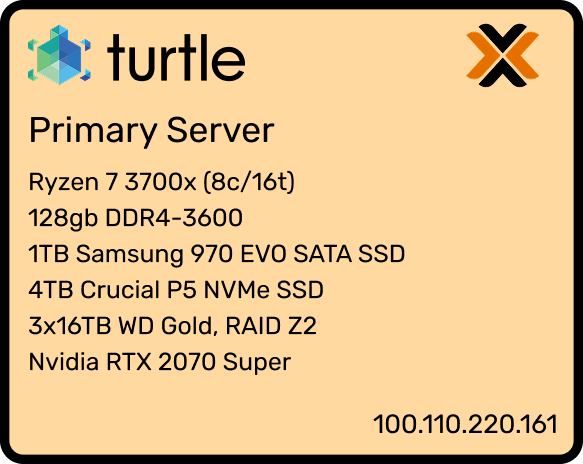
I chose the Ryzen 3700x (8 cores, 16 threads). A CPU with a decent core count (preferably at least 6c/12t) is a nice-to-have for running multiple VM’s, since each VM will need to use at least 1 thread.
If I were to rebuild my computer at time of writing, I’d probably go with a Ryzen 7700x, or a used 5900XT for a larger core count.
Going with AMD or Intel is a personal choice and there isn’t any clear winner at the moment, but I ultimately decided with getting an AMD CPU since their socket compatibility is better across generations (should I ever decide to upgrade).
ARM-based offerings (like Apple Silicon or the System76 Thelio Astra) are worth following, since they’re becoming widely popular in both datacenter and personal computing environments. I still wouldn’t recommend ARM at the present moment for compatibility and upgradability reasons, though I anticipate that to change by the end of the decade.
RAM
I got 128GB of RAM. Like core counts, this is another thing you’d ideally want a lot of to support running multiple VM’s.
I’m aware of the fact that RAM prices are skyrocketing at time of writing and 128GB in a single consumer machine today would be practically unobtainium. So do the best you can, and expect to be ripped off :’) but it’s still worth collecting as much as you’re able to. Consider purchasing used DDR4 sticks instead of DDR5 to reduce cost, since memory speeds and bandwidth are less important for most server applications (though this will also limit your CPU compatibility).
AMD Ryzen CPU’s support unregistered ECC memory, which provides extra error correction (useful when your server will be on for many months without a reboot). However, unregistered ECC is pricey and hard to obtain, so I decided that it wasn’t worth it for me. Maybe it is for you though! (Don’t get registered ECC- this type of memory only works on server platforms like Xeon.)
GPU
The question of ‘what GPU should I get?’ depends on what applications you’re planning on running.
- If you’re a cloud gamer, you probably want a mid-range consumer GPU (like a RTX 5070 Super).
- If you’re doing light/hobbyist AI development, you may want to consider a used RTX 3090 or 4090 (or a 5090)— however, make sure your case and power supply are beefy enough to handle it. You can also consider purchasing a DGX Spark or similar platform and connecting it to your network as a separate machine from your main server.
An ideal homelab setup with GPU passthrough would have two GPU’s: a low-powered cheap one to have output from Proxmox, and a higher-powered GPU to pass through to one VM. (Once the second GPU is passed through, it will no longer be accessible by any other VM!) For my setup, I got a used GTX 1080 for ~$250 on eBay (average price is likely lower when you read this- sort price from low to high).
You can get cheap used GPU’s for less than $50 like the GTX 1050 if you only need a basic video output for debugging purposes.
Case
In general, any standard size case will do. The main feature you’re looking for is the number of drive bays, assuming you’re building in NAS support. The Fractal Design R5 has 10 drive bays, making it an excellent choice for building a homelab. (I reused an old case from a previous non-server build, the CoolerMaster NR600.)
SSD
You’ll probably want some fast persistent storage to actually run VMs and Proxmox off of. You usually don’t need a lot of capacity- most VM’s will only require 32-64GB and you’ll only be running a handful.
I got a 1TB SSD; half of it is used by the Windows gaming VM though, so in practice it’s just a 500GB SSD.
Hard Drives
Typically, a storage server works by using software to combine many individual hard drives into a large pool.
If you’re planning on using ZFS or RAID (i.e. having some redundancy in case of disk failure which will happen if you’re running them 24/7), getting 3 or more identical disks will make configuration easier than mixing and matching.
Buy more disks than the actual capacity you want! You can find calculators online to see how much raw storage you need to achieve a certain capacity (ZFS here, RAID here). Generally, buying a little less than double your desired capacity is a safe bet (for example, if you want 10TB, buying 4x4TB (16TB raw) in 4-wide RAIDZ1 will do the trick).
UPS
An external UPS (Uninterruptible Power Supply) is highly recommended, since it will protect against power surges and outages by allowing your server to gracefully shut down whenever main power is cut.
When purchasing a UPS, look out for Pure Sine Wave (not approximate or stepped approximation)- although more costly, it can reduce the risk of damage to your components.
The most economical method of purchasing a UPS is to get it refurbished from a reseller such as ExcessUPS. You may also need to purchase a new battery for it (these are fairly standardized and found in many stores, both online and retail).