
Hello!
Over the past few years, I’ve been building up my personal server infrastructure. I wanted to share my experiences here in the hopes of filling in one of the biggest gaps in the traditional computer science curriculum: how to host and share the cool things we’ve created, and what “production deployment” really means behind the scenes.
I believe that running a server of some sort - whether it be a free cloud instance, a Raspberry Pi, or a system serving thousands of students - should be something all CS students (really anyone curious about computers) try out at some point in their learning journey.
In this series, I want to not only show you an example of how a homelab setup could look like, but also why I decided on the architecture I did so that you can make your own decisions about which parts to keep or change. This is not a step-by-step guide (there are lots of YouTube tutorials and blogs that help you achieve whatever you need to, some of which I’ll link below)- I would rather help you build the intuition you need to debug, solve problems, and make decisions about your own setup.
Some prerequisites and assumptions
Since this resource is intended for those with little to no experience with self-hosting, I won’t assume prior exposure to core concepts such as:
- Servers and hypervisors
- Virtual machines
- Domains, internet networking (HTTPS/TLS)
- (Reverse) proxies
- Docker and containerization
However, if I had to explain absolutely everything, we’d be here for a very long time. So I’ll have to make some assumptions about what you know, and where to go if these cassumptions do not hold.
- You’ve used the terminal before, and recognize basic Unix commands like
cd,ls,cat,ssh, andman. You’re also able to make simple edits to text files from the command line (CLI) usingvim,nano, etc. - You know how to find help if you get stuck on a bug, or want to understand more about what you’re doing.
- Luckily, debugging is now quite easy with the help of LLM’s (like Claude or ChatGPT). But I think it’s essential not to lean too heavily on LLMs to solve your homelabbing problems for you: one of the biggest value adds homelabbing provides is the ability for you to deeply understand your computer in a way that allows you to reason through the security implications of high-risk deployments like OpenClaw.
- You’re familiar with common computer terms like “operating system”, “disk”, “RAM”, “CPU”, “ethernet”, and “IP address”.
- Not sure what those are? Here’s an exercise of the previous part- you should be able to figure out what they are based on your online resource of choice.
What is a server, and why should I run my own?
The internet is made up of millions of devices, all interconnected through a complex series of cables, fiber optics, and wireless endpoints.
All of these devices agree on some common protocols, so they can understand each other. Some examples include:
- IP (Internet Protocol), which assigns addresses to hosts so you can contact them
- TCP (Transmission Control Protocol), which enables (mostly) reliable delivery of information between hosts
- HTTP (Hypertext Transport Protocol), which allows web applications to send and receive information
A personal computer or phone (maybe the device you’re reading this on) typically only leverages these protocols to send and receive information that you personally request it to. For example, if you type in a domain name like google.com into your browser’s search bar, you’re connecting to one of Google’s computers through some agreed-upon protocol.
In the scenario above, we call “Google’s computer” a server because it differs from your personal computer in a couple key ways:
- The server is running 24/7.
- The server responds to requests from other computers (like your own computer, known as a client).
So, if there’s some sort of service you’d like to host and allow others (or maybe just yourself) to use 24/7, then running a server is the way to go. Common services include:
- Creating a Google Drive-like storage server to get terabytes of cheap cloud storage in a place you trust
- Running a media server to share photos and videos with friends
- Hosting an ad blocker for your entire home network
- Hosting a personal LLM assistent like OpenClaw
- Running game servers (like Minecraft), or hosting a VM for cloud gaming with Parsec
The list goes on and on- if there’s something you use online (search engine, document editor, internet archive, social media…) chances are there’s a way to self-host it.
Self-hosting has a variety of benefits, mostly in exchange for the cost (monetary and time) of running the server to host them on:
- Control your own data and privacy options: Instead of trusting a big company like Google or Facebook to keep your sensitive data, you can put it on your own machine on your own network, and have full control over who can access that data.
- Recycle old hardware: Servers don’t need to be powerful datacenter beasts with a thousand ports and 100 petaflops of compute; you can get quite far with an old laptop or desktop that’s collecting dust in the closet.
- Get valuable experience: As I mentioned earlier, the skills you pick up from self-hosting things aren’t typically taught in school, and are critical for many software-related careers.
- Have a cool hobby: Running a server can be pretty fun and rewarding, just like other hobbies where you make stuff! Even if you somehow don’t find something super useful to host, it’s quite satisfying to tinker around and get things to work.
Homelabbing is Not Cloud Computing
I’ve been throwing around the term “homelab” a bit. It’s not exactly an official term, but it’s been adopted to mean any server where the hardware exists in your home or another physical location you control. (Here’s an article that reiterates this, with some extra info.)
Homelabbing is the form of self-hosting that I’ll focus on, since it’s what I do- but there are plenty of other methods of running your own services to choose from.
A popular choice is to buy a VPS (Virtual Private Server) or VM from a provider online, such as DigitalOcean or Linode. This allows you to install and run whatever software you want, while not having the hassle of needing to manage the hardware itself. If you choose to do this, skip directly to Part 3.
Another alternative, which is more popular in corporate settings, is the serverless approach, in which you only manage your application, and all of the server configuration is left to the provider. Common serverless providers include AWS Lambda and Vercel Functions. I would not recommend this for personal setups, since it can get really expensive for personal use and doesn’t provide the benefit of helping you understand how servers work.
Introducing TurtleNet
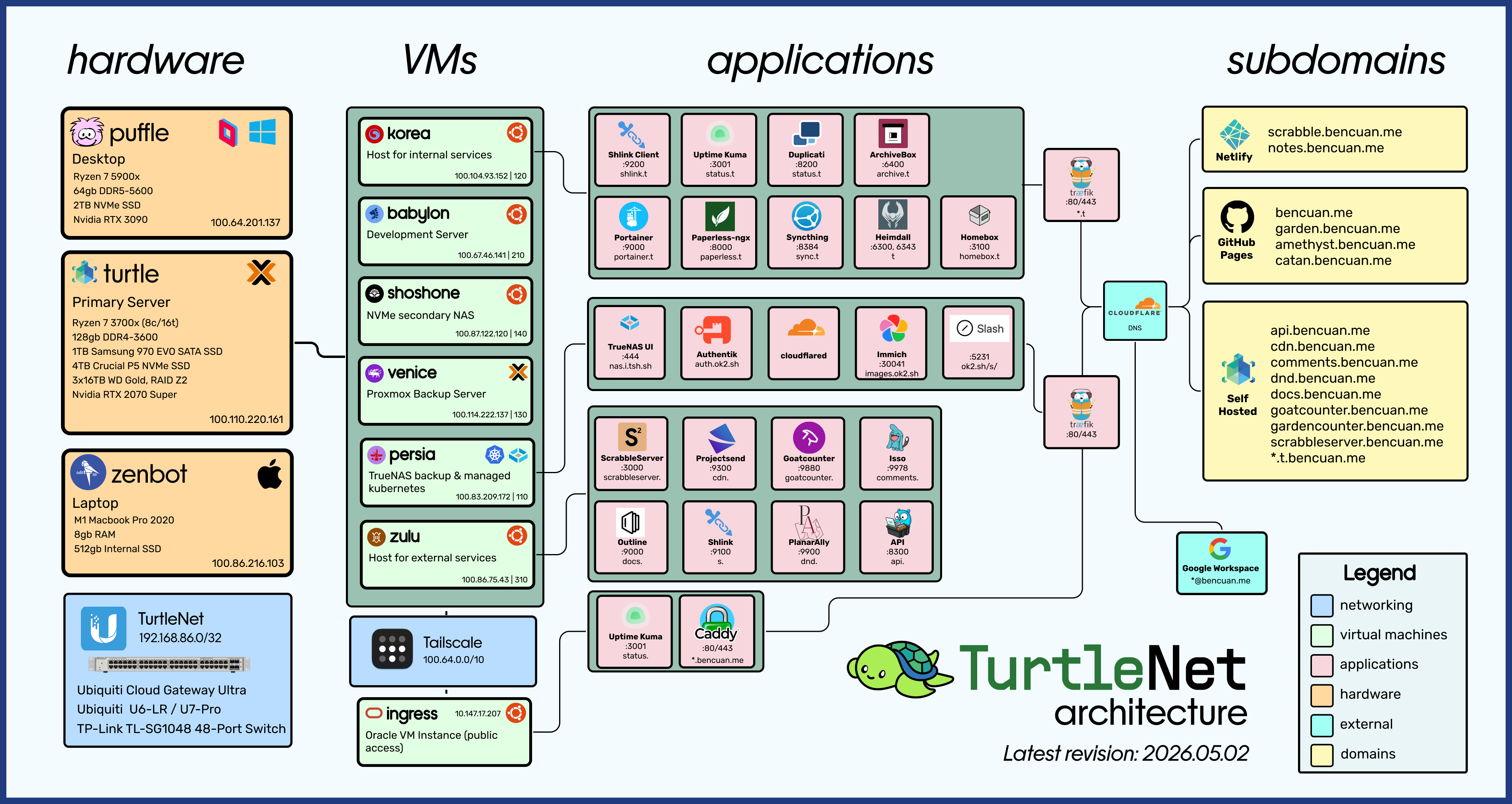
TurtleNet is my personal setup, and what I’ll be modeling this guide after. Over the course of this series, I’ll explain all the components in the diagram above, and the decisions that went into designing them.
To reiterate, I don’t want you copying every bit of my architecture- there’s a lot of stuff that makes sense for myself, but probably won’t for your use case. Part of the fun of building a homelab is forming your own opinions about what you like and don’t like; there is no single source of truth! I’ll mention common alternatives whenever they arise.
More Resources
Here are some resources that I used while setting up TurtleNet. I recommend browsing one or more of them in parallel to this guide so you can get exposed to multiple perspectives.
- TechnoTim and Craft Computing: two homelabbing YouTube channels that have very well-made guides
- r/homelab and r/selfhosted: a source for inspiration and to see what everyone else is doing with their setups